Build Salesforce faster, right inside your org.
Salesforce Fusion is a Chrome extension that puts a code editor, an object inspector, data tools and debugging on top of the org you're already signed into. No Developer Console, no Workbench, no extra logins.
Works with Production, Sandbox, Developer and Scratch orgs
Read and edit every part of your codebase
 Apex Classes
- Apex Triggers
 Lightning Web Components
 Aura Components
 Visualforce
 Message Channels
Three views. One extension.
A full editor when you're writing code, a quick panel when you're clicking around, and an inspector when you need to know how an object is built.
A proper code editor for your org.
Every Apex class, trigger, LWC, Aura bundle and Visualforce page in one file tree, loaded straight from the org you're signed into. Press Ctrl + P to open any file, edit it, and save it back without leaving the browser.
- Create classes, triggers, LWC, Aura, Visualforce and message channels from templates
- Search all code in the org from one box
- Run tests and check org-wide and per-class Apex coverage
- Anonymous Apex, Dependency Graph, REST Explorer, Package Manager and JSON → Apex built in
Your toolbox, on top of any Salesforce page.
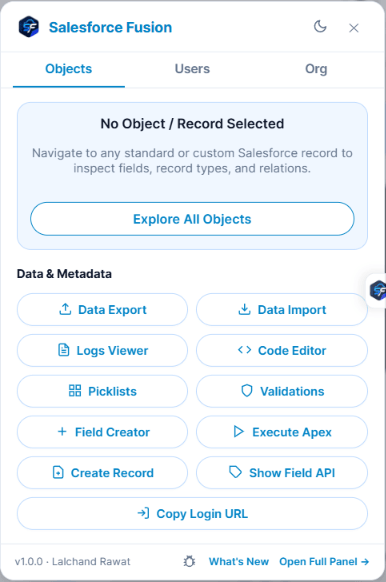
Open the panel from the launcher on any Lightning page. It picks up the record or object you're looking at, so fields, record types and relationships are a click away instead of three Setup screens.
- Objects, Users and Org tabs for the context you're in
- Data export and import, logs viewer and Execute Apex
- Picklists, validation rules, field creator and field API names
- Copy a login URL, switch to dark mode, or open the full panel
Understand any object in seconds.
Every field with its label, API name, type, length and attributes in one table you can filter as you type. Switch to validation rules, automation, record types or relationships, or jump to Setup or a query from the header.
- Filter by custom, standard, required, picklist, lookup or formula
- External ID, unique and name fields flagged at a glance
- Copy API names, open Setup or query the object in one click
- Show Data, Picklist Matrix, Flows, Bulk Schema and more in the sidebar
Close the other ten tabs.
The tools you jump between every day, in one place and already signed in.
Code
- Code editor
- Search all code
- Anonymous Apex
- Test runner & coverage
- Dependency graph
- JSON → Apex
- LWC builder
- Package manager
Data
- Show Data
- Data export
- Data import
- Create record
- Picklist matrix
Schema & config
- Object inspector
- Field creator
- Bulk schema
- Validation rules
- Flows
- Record types & relationships
- Show field API names
Debug & org
- Apex logs
- Execute Apex
- REST Explorer
- User details
- Org details
- Copy login URL
- Quick actions
Up and running in under a minute.
- Step 1
Add it to Chrome
Install Salesforce Fusion from the Chrome Web Store. It's free.
- Step 2
Open your org
Sign in to any Production, Sandbox, Developer or Scratch org as usual. There's nothing to connect.
- Step 3
Click the launcher
Open the quick panel from the Fusion icon on the page, or go straight to Studio or the full panel.
Your session. Your data. Your org.
Fusion runs in your browser using the Salesforce session you already have. There's no Fusion account and no middle server between you and your org.
Read how the extension handles dataNo extra login
Uses the session you're already signed in with. No tokens or connected app to set up.
Straight to Salesforce
Requests go from your browser directly to your org's APIs.
No tracking
No analytics or telemetry in the extension.

Spend less time clicking through Setup.
Free to install. Works the moment you open your org.